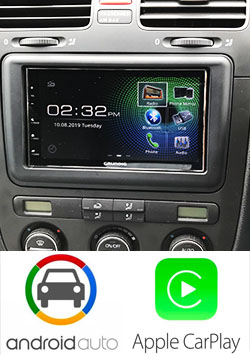
JVC KW-V250BT DVD / Bluetooth / USB
Check for Availability with us


Details
Highlights
Key Customize New
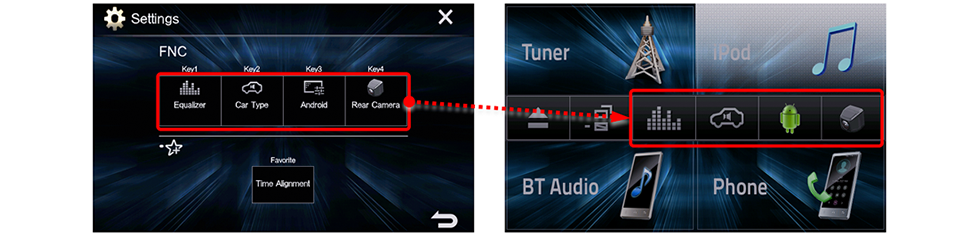
Two options let you easily access frequently used functions.
1. Function Menu Customization
Functions registered in the Function Menu can easily be called up by simply pressing the "FNC" key.
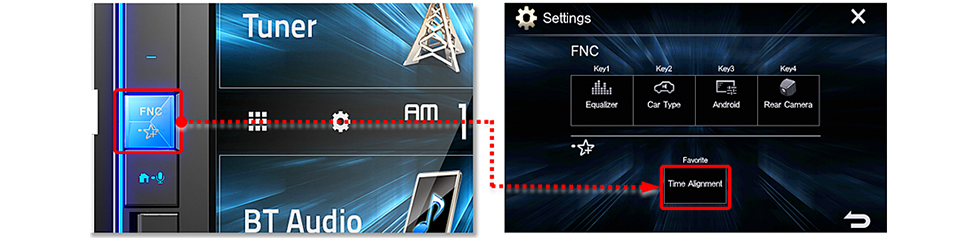
2. Favorite Key
Press and hold the “FNC” key to directly access the function registered for the Favorite Key.
Clear Resistive Touch Panel Display
The clear resistive touch panel with high transparency and high luminance provides bright images with vivid colors.
Music Sync. Effect New
The illumination flashes along with the rhythm of the music.
Gesture Touch Control
Just touch and move your finger over the screen for various operations corresponding to your finger movements. Intuitive control provides safer operation for in-car entertainment.

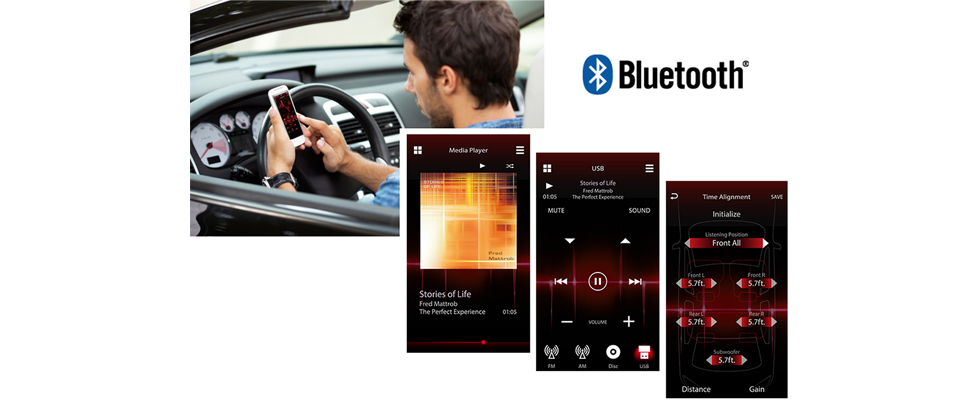
Bluetooth® Wireless Technology
2 Phones Full-Time Connection
You can connect two phones full time via Bluetooth, with secure and simple pairing. Calls to either phone can be received by a push of a key on the receiver.

iPhone® Bluetooth Automatic Pairing
Just connect your iPhone via USB and the automatic Bluetooth pairing function will work to complete the pairing. No complicated manual procedure to worry about.
Bluetooth Voice Recognition
Improved Sound Quality with HFP 1.6 Wideband Speech
Improved sound quality thanks to HD Voice contributes to a higher level of voice recognition accuracy.
Bluetooth AVRCP1.5 for Versatile Song Selection
In addition to repeat and random playback of music files, you can also easily search for songs using the browsing function. Just look for and choose the song you want to hear from the folder name and song name lists.
JVC Streaming DJ
Connect up to 5 Bluetooth devices simultaneously, allowing you and your friends to take turns streaming music like a DJ. Move to the groove and get the party pumping to the max.

Sound Optimization

K2 Technology for Enhanced Digital Sound Quality
K2 is a JVC original technology that reproduces the original master sound by expanding the frequency range. For example, K2 will expand the digital data of the audio CD recorded at 44.1 kHz/16 bit to 192 kHz/24 bit. It is also possible to recreate the high-frequency range above 20kHz that is cut during the CD formatting.

Time Alignment
By selecting the speaker type and the distance to the center of the listening position, the receiver will automatically adjust the timing of the sound output from each of the speakers so that the sound from each of the speakers will arrive exactly at the same time to the listening position.

Remote Control App
Control the receiver's source directly from the smartphone using simple finger gestures with "JVC Remote" app* (now available for both iOS and Android). You can even customize your audio setting, and see detailed source information such as song title, artist name and album art etc. from the smartphone.
KW-V250BT
| Screen Size | 6.2" Wide VGA |
| Touch Panel | Clear Resistive |
| Monitor Touch Control | Yes |
| MP3 Compatible with Tag | CD / DVD / USB |
| CD-R/RW Compatible | Yes |
| DVD-R/-RW, +R/+RW Compatible | Yes |
| Built-in Bluetooth[1] | Yes (Version 3.0, Wired-Mic included) |
| 2 Phones Full-Time Connection | Yes |
| 5 BT-Audio Connection | Yes |
| Siri Eyes Free Mode for iPod/iPhone | Yes |
| Alphabetical Search for Phone Book | Yes |
| Auto Pairing for iPhone/Android | Yes |
| Android Music Playback | Yes (via Bluetooth(R)) |
| iPod/iPhone Music Playback | Yes (via USB or Bluetooth(R)) |
| USB Port | x1 (USB2.0 Full Speed/High Speed) |
| USB Power Supply | Yes (1.5A High Current Charging) |
| Maximum Power Output (Front & Rear) | 50Wx4 |
| Full Bandwidth Power (Front & Rear) | 22W x 4 (Full Bandwidth Power, at less than 1% THD) |
| EQ | Yes (13-Band Graphic EQ) |
| Installation Size | 7-1/16" x 3-15/16" x 6-7/16" (178 x 100 x 162 mm) |
| Weight | 3.75 lbs. (1.7kg) |
| Unit weight in individual package | 5.29 lbs. (2.4kg) |
More Information
| Functions | CD/DVD, Bluetooth, 2 DIN Size |
|---|


Best sellers

German GRUNDIG GX-3800 Apple Carplay / Android Auto / Android Mirror / Bluetooth / USB

OTTOCAST A2Air Pro Wireless Android Auto Adapter

German GRUNDIG GX-2800 Bluetooth / USB / Made for Iphone / Android Mirror Link


OEM Carplay Unit for Volkswagen MK5 / MK6

Mazda Connect Apple Carplay / Android Auto Fitted